1.School network: The campus network uses wireless network services provided by the information Network Technology Center, The login account is the student ID, and the pass-word is the last six digits of the student's passport number. The wireless network is named "iXAUT".
2.Student Card: The student card is used by students of our university for on-campus life, with functions such as student identity recognition, living consumption services, and book borrowing.
3.Mobile Login Process for Student Card:
Step 1: Open WeChat, search and follow the official account "i西理"
Step 2: Enter your unified identity authentication username and password. Newly enrolled students and faculty must activate their accounts upon first login. Click "Account Activation" on the authentication login page to proceed.
Step 3: On the main page of the official account, tap “融合门户”→"Services"→"Student Card Services" to access the mobile Student card system.
4.Student card application location:
Jinhua Campus Information Comprehensive Service Center
Address: West side of West 1st floor
Phone number: 61125672 or 61125674
Qujiang Campus Information Comprehensive Service Center
Address: Service Hall of Yifu Science and Technology
Phone number: 6123930 or 61123938
Please scan the QR code to follow the "i西理" WeChat official account

5.Email Login
International students email account: Remove the letter "L" from your student ID and use the remaining numbers +@stu.xaut.edu.cn.
The password is: XUT + the last six digits of your passport number + #
Example: XUT985623#
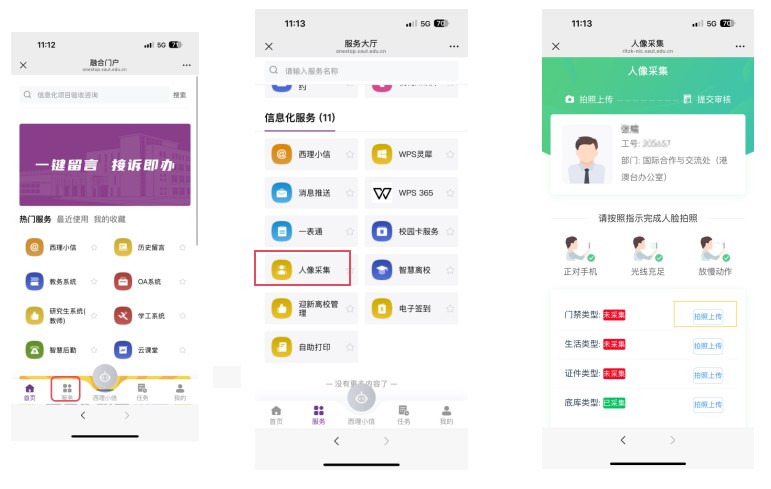
6.Facial Recognition Access Registration
After logging into the "融合门户," click on "Services," locate "人像采集" under "信息化服务," and then select the "门禁类型" to take and upload a photo.